Last Updated on September 13, 2026
Are you ready to enjoy fresh, delicious coffee every morning without the hassle? Learning how to operate your Hamilton Beach BrewStation can make your daily brew simple and quick.
Whether you’re new to this coffee maker or just want to get the most out of it, this guide will walk you through every step. By the end, you’ll know exactly how to use your BrewStation to get perfect coffee every time.
Keep reading, and discover how easy and satisfying brewing your favorite coffee can be!
Hamilton Beach Brewstation Features
The Hamilton Beach Brewstation offers a mix of smart design and useful features. It makes brewing coffee simple and quick. This coffee maker fits well in many kitchens. It helps you enjoy fresh coffee anytime without hassle.
Design And Capacity
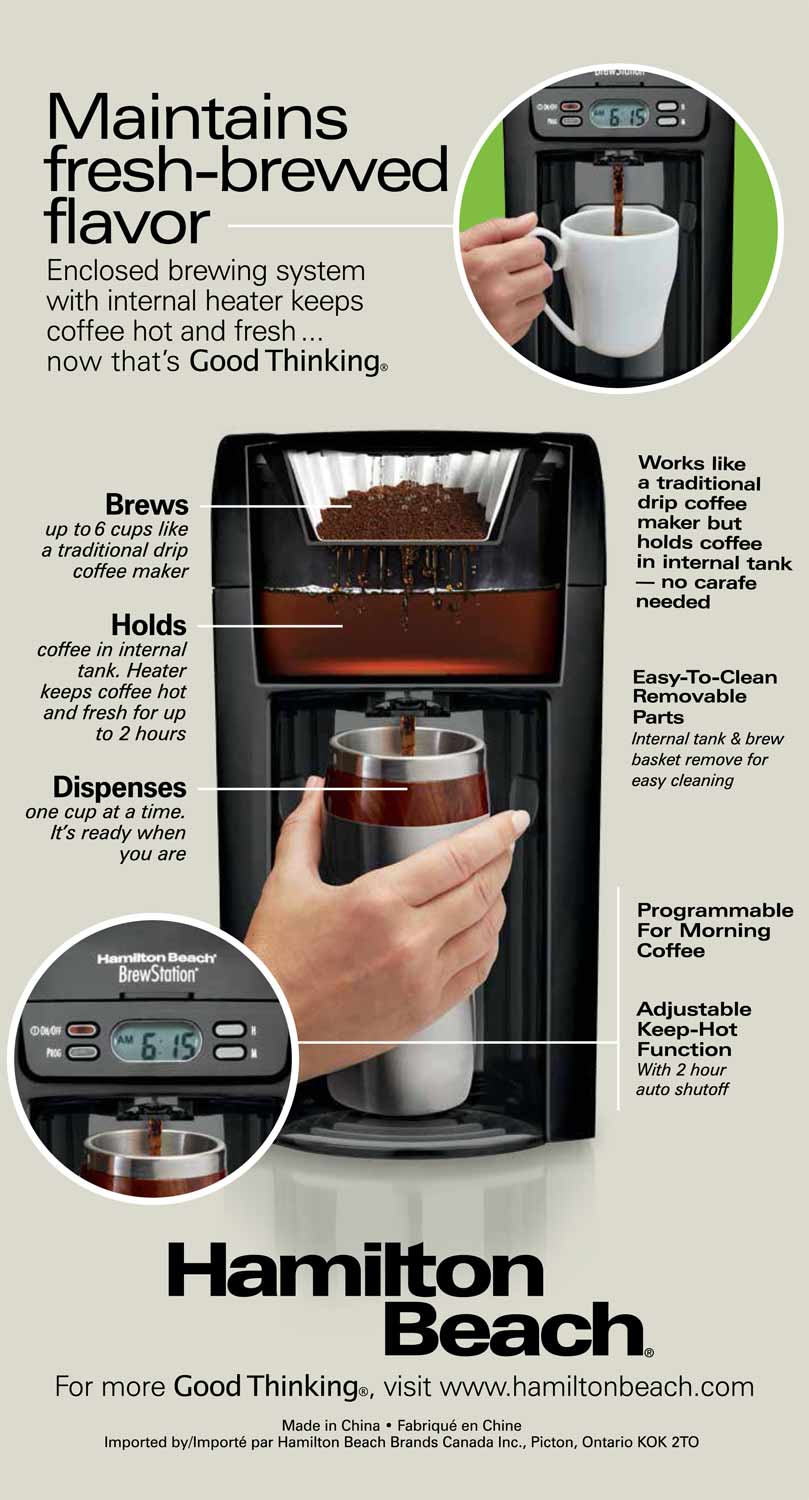
The Brewstation has a sleek and compact design. It saves counter space in your kitchen. It holds up to 40 ounces of coffee. This is about five cups. The carafe is built-in, not a typical pot. It keeps coffee fresh longer. No need for a separate warming plate.
Control Panel Overview
The control panel is easy to use. It has simple buttons for power and brew strength. The digital display shows the time and settings clearly. You can set a timer for automatic brewing. It lets you choose regular or bold coffee. The controls are straightforward and clear.
Special Functions
The Brewstation has a pause-and-serve feature. You can pour a cup before brewing ends. It also has a keep-warm function to keep coffee hot. The machine alerts you when it needs cleaning. This helps maintain the best taste. The Brewstation offers convenience with every cup.
Setting Up Your Brewstation
Setting up your Hamilton Beach Brewstation is the first step to great coffee. This process ensures your machine works well and your coffee tastes fresh. Follow these simple steps to get started right.
Proper setup helps avoid problems and makes your brewing smooth. Take your time to clean, add water, and choose the right coffee grounds.
Initial Cleaning
Start by cleaning the Brewstation before the first use. Remove all parts that come in contact with water and coffee. Wash them with warm, soapy water. Rinse well to remove soap residue. Wipe the machine’s exterior with a damp cloth. This step removes dust and factory residues. It also ensures your coffee tastes pure.
Adding Water And Coffee
Fill the water reservoir with fresh, cold water. Do not use hot or flavored water. Use the fill line inside the tank as a guide. Add coffee grounds to the filter basket next. Avoid overfilling to prevent clogging. Close the lid tightly before brewing. The correct water and coffee amount help balance taste and strength.
Choosing The Right Coffee Grounds
Use medium grind coffee for the Brewstation. Too fine grounds may block the filter. Too coarse grounds can make weak coffee. Pick fresh coffee for the best flavor. Avoid oily or flavored beans. These can leave residue in the machine. Fresh, medium grind coffee gives the best results every time.
Brewing Coffee
Brewing coffee with the Hamilton Beach BrewStation is simple and quick. This machine offers easy controls for a fresh cup anytime. Understanding the brewing process helps you enjoy the best flavor.
The BrewStation allows you to choose how strong your coffee will be. It also lets you start brewing with one touch. Plus, you can pause the cycle to pour a cup without waiting.
Selecting Brew Strength
Press the brew strength button to choose between regular or bold coffee. The bold setting makes a stronger, richer taste. Regular strength is lighter and smooth. This feature adapts to your mood or time of day.
Starting The Brew Cycle
Fill the water reservoir with fresh water first. Add coffee grounds to the filter basket next. Close the lid securely. Press the start button to begin brewing. The machine heats water and drips it over the grounds slowly.
Using The Pause And Serve Feature
This feature lets you pour coffee before the full pot finishes. Just lift the carafe carefully to stop the flow. Pour your cup, then place the carafe back. The machine will resume brewing without spills.

Credit: www.youtube.com
Maintaining Your Brewstation
Maintaining your Hamilton Beach Brewstation is key to enjoying fresh coffee every day. Proper care helps the machine last longer and work better. Clean parts and regular check-ups keep the coffee tasting great. Follow these simple steps to keep your Brewstation in top shape.
Regular Cleaning Tips
Clean the Brewstation after each use. Remove the brew basket and wash it with warm, soapy water. Wipe the water reservoir and the outside of the machine with a damp cloth. Avoid using harsh cleaners or abrasive pads. Dry all parts before putting them back. Regular cleaning prevents buildup and keeps the coffee fresh.
Descaling Process
Descale the Brewstation every few months to remove mineral buildup. Use a descaling solution or white vinegar mixed with water. Fill the water reservoir with the solution. Run a brewing cycle without coffee grounds. After that, run two cycles with clean water to rinse. This process helps keep the machine working well and extends its life.
Replacing Parts When Needed
Check the Brewstation parts regularly for wear. Replace the brew basket if it cracks or breaks. Change the water filter every two months or as needed. Use only genuine replacement parts for the best fit. Replacing worn parts helps maintain coffee quality and machine performance.
Troubleshooting Common Issues
Troubleshooting common issues with the Hamilton Beach Brewstation helps keep your coffee routine smooth. Small problems can stop the machine or affect coffee quality. Knowing simple fixes saves time and frustration. Below are typical issues and how to solve them quickly.
Machine Not Brewing
Check if the machine is plugged in and the power is on. Make sure the water reservoir has enough water. Confirm the brew basket is properly placed and the lid is closed. Clean any coffee grounds blocking the filter or spray head. Reset the machine by turning it off and on again.
Coffee Tastes Weak Or Bitter
Use fresh coffee beans and the right grind size. Too coarse coffee makes weak brew; too fine causes bitterness. Clean the Brewstation regularly to remove old coffee oils. Use the correct water temperature, around 195 to 205 degrees Fahrenheit. Avoid using stale or poor-quality coffee.
Error Messages And Indicators
Refer to the user manual for specific error codes. Common errors include water shortage or brew basket misplacement. Clear any blockages and refill water as needed. Restart the machine after fixing errors. Contact customer support if the problem persists.
Credit: hamiltonbeach.com
Maximizing Coffee Flavor
Getting the best taste from your Hamilton Beach Brewstation depends on a few simple steps. Small changes make a big difference in flavor. Let’s explore how to maximize your coffee’s taste with easy tips.
Optimal Coffee To Water Ratio
Using the right amount of coffee and water is key. Too much water makes coffee weak. Too much coffee makes it bitter. The ideal ratio is two tablespoons of coffee per six ounces of water. Measure carefully for consistent flavor every time.
Using Fresh Coffee Beans
Fresh beans give the richest taste. Coffee starts losing flavor soon after grinding. Buy whole beans and grind just before brewing. This keeps the oils and aroma intact. Avoid pre-ground coffee if you want the best brew.
Storage Tips For Freshness
Keep beans in an airtight container. Store them in a cool, dark place. Avoid the fridge or freezer, which cause moisture. Use beans within two weeks of opening for peak freshness. Proper storage preserves the coffee’s natural flavors longer.

Credit: www.youtube.com
Frequently Asked Questions
How Do I Start The Hamilton Beach Brewstation?
To start, fill the water reservoir and add coffee grounds to the filter. Close the lid securely, place the carafe, then press the brew button.
How To Clean The Hamilton Beach Brewstation?
Remove the filter and carafe. Wash them with warm soapy water. Wipe the machine’s exterior with a damp cloth regularly.
Can I Use Ground Coffee Or Pods?
The Brewstation uses ground coffee only. Avoid coffee pods as they don’t fit the filter basket properly.
How Long Does Brewing Take On The Brewstation?
Brewing usually takes about 5 to 10 minutes, depending on the coffee amount and water temperature.
Conclusion
Operating the Hamilton Beach Brewstation is simple and quick. Follow the steps carefully for the best coffee experience. Clean the machine regularly to keep it working well. Use fresh water and good coffee grounds every time. Enjoy your coffee straight from the built-in carafe.
This machine saves time and makes brewing easy. Try different coffee types to find your favorite taste. A little care helps the Brewstation last longer. Now you can enjoy fresh coffee with less effort.