Last Updated on September 14, 2026
Is your Keurig coffee maker not brewing the perfect cup like it used to? You’re not alone, and the good news is that many common problems can be fixed quickly and easily.
Imagine enjoying your favorite coffee without the frustration of leaks, clogs, or error messages. In this guide, you’ll discover simple steps to get your Keurig working like new again. Keep reading—you’re just minutes away from brewing that perfect cup again.
Common Keurig Issues
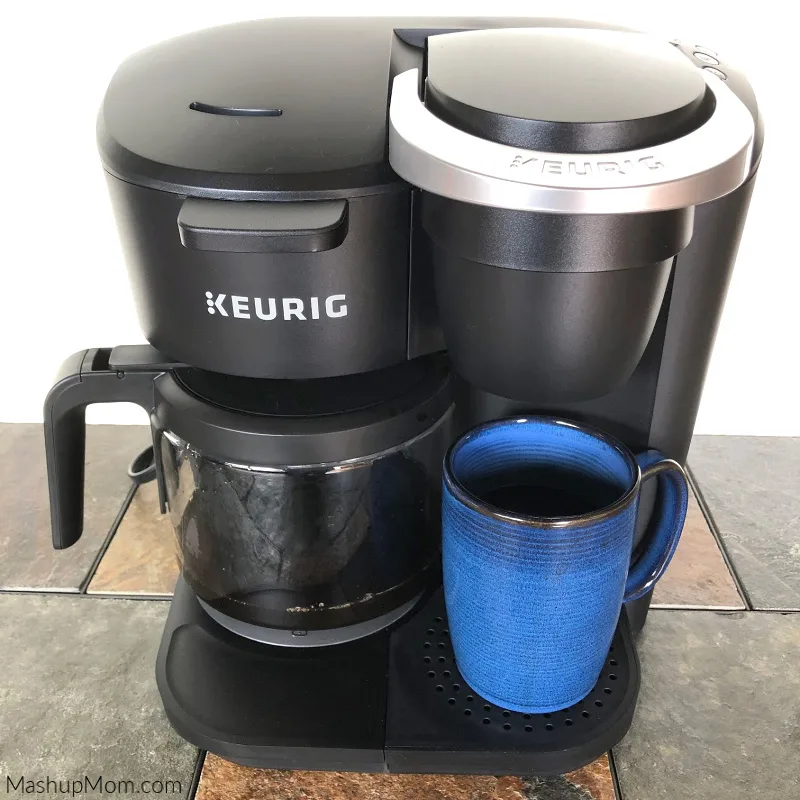
Keurig coffee makers are popular for their convenience. Still, users face common problems that stop the machine from working well. Understanding these issues helps you fix the machine quickly. This saves time and keeps your coffee routine smooth.
Machine Not Brewing
The machine might not brew if the water tank is empty. Check the tank and fill it if needed. Sometimes, the needle that pierces the K-cup is clogged. Clean the needle carefully to remove any coffee grounds. A blocked needle stops water flow and brewing. Also, ensure the K-cup is placed properly. Misplaced pods can cause brewing failure.
Leaking Water
Water leaks often come from a loose water tank. Make sure the tank fits snugly on the machine. Check the drip tray and empty it if full. A damaged water reservoir or hose can also cause leaks. Inspect these parts for cracks or breaks. Replace any faulty pieces to stop leaks.
Error Messages
Keurig may show error messages for various problems. A common one is a descaling alert. This means minerals block the machine’s inside. Run a descaling cycle using a vinegar or descaling solution. Another error can mean a problem with the sensors. Turn off the machine and unplug it. Wait a few minutes before turning it back on.
Weak Coffee
Weak coffee can result from using old or low-quality coffee pods. Use fresh pods for stronger taste. A dirty needle or filter can also cause weak coffee. Clean these parts regularly. Check the water temperature too. If the water is not hot enough, coffee will taste weak. Descale the machine often to keep it working well.
Credit: www.mashupmom.com
Basic Troubleshooting Steps
Basic troubleshooting steps help fix common Keurig coffee maker issues fast. These steps save time and avoid costly repairs. Follow simple checks to find the problem and get your coffee brewing again.
Resetting The Machine
Resetting the Keurig clears minor errors and glitches. Unplug the machine from the power outlet. Wait for 5 minutes to let it cool down. Plug it back in and turn it on. This often solves freezing or error messages.
Checking Water Reservoir
Check if the water reservoir is full. The machine stops working with low water. Remove the reservoir and clean it if dirty. Make sure it fits securely in place. Use fresh water for the best taste.
Inspecting Power Supply
Inspect the power cord and outlet for damage. Try plugging the machine into a different outlet. Avoid using extension cords or power strips. A steady power supply is crucial for operation. Replace damaged cords to prevent hazards.
Cleaning And Descaling
Cleaning and descaling keep your Keurig coffee maker working well. Regular care stops clogs and bad taste. It removes hard water minerals that build up inside the machine. This helps your coffee taste fresh and your brewer last longer.
Removing Mineral Buildup
Mineral buildup blocks water flow and changes flavor. Use white vinegar or lemon juice to dissolve these minerals. Fill the water reservoir with one of these liquids mixed with water. Run the brew cycle without a K-cup until the reservoir is empty. Repeat if needed to clear all deposits.
Using Descaling Solutions
Descaling solutions are made for coffee machines. They remove minerals faster than vinegar. Pour the solution in the water tank and start the brew process. Let the machine sit after the cycle to work inside. Run clean water cycles to flush out the solution and taste.
Cleaning Needle And Parts
The needle pokes holes in K-cups and can clog. Unplug the machine and open the K-cup holder. Use a paperclip or brush to clean the needle carefully. Remove and wash removable parts with warm soapy water. Dry all parts well before putting them back.

Credit: www.youtube.com
Fixing Brew Temperature Problems
Brew temperature problems affect the taste of your coffee. The coffee might taste too weak or too bitter. Fixing the temperature can improve your coffee’s flavor. It also helps the machine work better and last longer.
Adjusting Temperature Settings
Some Keurig models let you change the brew temperature. Check your machine’s manual to see if this option exists. Use the control panel to find the temperature setting. Increase or decrease the heat depending on your taste. A higher temperature often makes stronger coffee. A lower temperature may suit lighter roasts better.
Improving Water Heating
Water heating problems can cause wrong brew temperatures. Clean the machine regularly to remove mineral buildup. Use filtered water to avoid deposits inside the heater. If the water does not heat properly, the heating element may be damaged. In this case, consider professional repair or replacement. Keeping the water hot ensures better coffee extraction and flavor.
Addressing Leaks And Drips
Leaks and drips can spoil your coffee experience. They waste water and coffee grounds. Fixing these issues helps your Keurig work like new again. Many leaks happen because of worn seals or loose parts. Quick checks and simple repairs often stop leaks fast. Follow these steps to fix leaks and drips easily.
Replacing Seals And Gaskets
Seals and gaskets keep water inside the machine. Over time, they wear out or crack. This causes water to leak during brewing. Find the worn seal or gasket by checking around the water reservoir and brew head. Remove the old part carefully. Install a new seal or gasket that fits your Keurig model. Press it firmly in place. This can stop leaks and improve water flow.
Tightening Connections
Loose connections cause water to drip from joints. Check all parts where water flows. These include the water reservoir, brew head, and drip tray. Use a screwdriver or your hands to tighten screws and fittings. Make sure everything fits snugly but avoid over-tightening. Loose parts can let water escape. Tight connections keep your machine sealed and leak-free.
Replacing Faulty Components
Replacing faulty parts in your Keurig coffee maker can fix many common problems. Small issues often stop the machine from working well. Changing broken parts can save money and extend the machine’s life.
Focus on key components that wear out over time. These parts affect how the machine brews coffee. Fixing them can bring back the perfect cup.
Changing The Water Pump
The water pump moves water through the machine. If it fails, the coffee won’t brew properly. To change it, unplug the machine and open the casing carefully. Remove the old pump and disconnect its wires. Connect the new pump and secure it in place. Test the machine to ensure water flows smoothly.
Swapping Out The Needle
The needle pierces the K-Cup to release water. A clogged or bent needle stops water flow. Remove the needle by unscrewing or unclipping it. Clean or replace the needle with a new one. Reinstall it securely. This fixes brewing problems caused by blockages.
Replacing The Water Reservoir
The water reservoir holds the water for brewing. Cracks or leaks can cause issues. Remove the old reservoir by lifting or sliding it off. Fit the new reservoir in the same spot. Ensure it locks into place to avoid leaks. Fill it with water and test the machine.
Preventive Maintenance Tips
Preventive maintenance keeps your Keurig coffee maker working well. Small daily habits stop big problems later. Follow easy tips to extend your machine’s life. Save time and money by caring for your brewer now.
Regular Cleaning Schedule
Clean your Keurig every week to avoid blockages. Remove the pod holder and wash it with warm water. Wipe the outside of the machine with a damp cloth. Run a cleaning cycle with vinegar or a descaling solution monthly. This removes mineral build-up inside the machine. Clean water lines make better coffee and prevent errors.
Using Filtered Water
Use filtered water instead of tap water in your Keurig. Filtered water has fewer minerals that cause build-up. This means less cleaning and longer machine life. It also helps your coffee taste fresher and cleaner. Avoid bottled water with added flavors or sugars. Plain filtered water works best for your brewer.
Storing The Machine Properly
Turn off and unplug your Keurig when not in use. Empty the water reservoir to prevent mold or bacteria growth. Store the machine in a dry place, away from heat or sunlight. Cover it with a clean cloth to keep dust out. Proper storage stops damage and keeps your coffee maker ready.

Credit: www.youtube.com
Frequently Asked Questions
How Do I Reset My Keurig Coffee Maker?
To reset, unplug the machine for 5 minutes. Then plug it back in and turn it on. This clears minor errors and restores default settings.
Why Is My Keurig Not Brewing Coffee?
Check the water reservoir and ensure it’s full. Clean the needles and descale the machine regularly to avoid clogs.
How Can I Descale My Keurig Coffee Maker?
Use a descaling solution or white vinegar. Run the descaling process as per the manual to remove mineral buildup effectively.
What Causes Keurig To Show Error Messages?
Error messages often result from clogged needles, empty water tanks, or internal malfunctions. Cleaning and resetting usually fix these issues.
Conclusion
Fixing your Keurig coffee maker can save time and money. Small issues like clogs or leaks often cause problems. Regular cleaning helps keep your machine working well. Follow simple steps to troubleshoot before calling for repairs. A well-maintained Keurig makes better coffee every time.
Enjoy fresh coffee without stress or extra costs. Keep your machine clean, and it will last longer. Quick fixes often solve common problems fast. Don’t give up—your coffee maker can work like new.