Last Updated on March 8, 2026
Is your Brio water dispenser suddenly beeping and you’re not sure why? That annoying sound can disrupt your day and leave you wondering if something is wrong.
You rely on your dispenser for fresh, clean water, so when it starts making noise, it’s natural to feel concerned. But don’t worry—this beeping usually has simple causes and easy fixes. Keep reading, and you’ll discover exactly why your Brio water dispenser is beeping and how to stop it quickly.
Your peace of mind and a quiet home are just a few steps away.

Credit: www.reddit.com
Common Causes Of Beeping
The Brio water dispenser beeping can be confusing. It often signals something that needs attention. Understanding the common causes helps you fix the problem fast. The beeps are not random; they have a purpose. They warn you about water, filters, temperature, or sensors. Let’s explore each cause to know why your dispenser beeps.
Low Water Level Alert
The dispenser beeps when the water runs low. It stops working until you add water. This alert prevents damage to the machine. Filling the tank usually stops the beeping quickly. Check the water level often to avoid this issue.
Filter Replacement Reminder
The dispenser tracks filter use and beeps when it’s time to replace it. Clean water depends on a fresh filter. Ignoring the beep may affect water taste and safety. Change the filter according to the schedule to keep water pure.
Temperature Issues
The dispenser beeps if water gets too hot or too cold. This can happen if the cooling or heating system fails. The beep warns you to check the temperature settings. Adjusting or fixing the system stops the beeping.
Electrical Or Sensor Malfunctions
Sometimes, the beeping means a sensor or electrical part is faulty. Dirt or damage can cause sensor errors. The machine alerts you to avoid bigger problems. Cleaning or repairing sensors often resolves this issue.
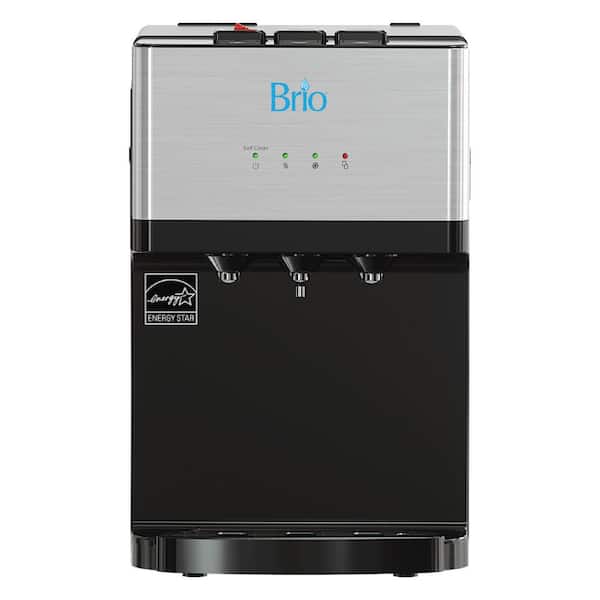
Credit: www.homedepot.com
Immediate Steps To Silence Beeping
The beeping sound from your Brio water dispenser can be annoying. It signals something needs your attention. Acting quickly helps stop the noise and keep the dispenser working well.
Follow these simple steps to silence the beeping fast. Each step targets common causes for the alert. Check each one carefully to find the solution.
Resetting The Dispenser
Unplug the water dispenser from the power outlet. Wait 30 seconds to let it reset. Plug it back in and listen for the beeping. This step often clears small errors.
Checking Water Supply
Make sure the water bottle is full and properly seated. Look for any air bubbles or leaks. The dispenser beeps if it does not get enough water. Fixing the water supply stops the alert.
Inspecting The Filter
Remove the water filter and check for dirt or blockage. A clogged filter causes the beeping sound. Clean or replace the filter as needed. This keeps water flowing smoothly.
Adjusting Temperature Settings
Check the temperature controls on the dispenser. Too high or low settings may trigger beeping. Set the temperature to the recommended range. This adjustment can stop unnecessary alerts.
Preventive Maintenance Tips
Preventive maintenance keeps your Brio water dispenser working well. It stops beeping and other issues before they start. Simple care steps help your dispenser last longer and stay clean. Follow these tips to avoid common problems and enjoy fresh water every day.
Regular Cleaning Schedule
Clean the dispenser every two weeks to remove dirt and germs. Wipe the outside with a soft cloth and mild soap. Clean the drip tray and water spout to avoid buildup. This stops bacteria and keeps your water safe to drink.
Timely Filter Changes
Change the water filter as recommended by the manufacturer. A clogged filter can cause the dispenser to beep. New filters improve water taste and prevent damage. Mark your calendar to remember the change date.
Ensuring Proper Installation
Check that the dispenser is placed on a flat, stable surface. Make sure all parts are connected tightly and correctly. Incorrect installation can cause leaks and trigger alarms. Follow the user manual for setup instructions.
Monitoring Water Quality
Use clean, fresh water to fill your dispenser. Hard or dirty water can harm the machine and cause beeping. Test your water quality regularly, especially if using well water. Good water helps the dispenser work smoothly.
When To Contact Support
Knowing when to contact support for your Brio water dispenser is important. Some issues need expert help to avoid damage. This section guides you on key signs to reach out for assistance.
Persistent Beeping After Fixes
The water dispenser may beep after you try to fix it. If the sound does not stop, it signals a deeper problem. Continued beeping can mean sensor or electrical faults. Contact support to prevent further damage or safety risks.
Unusual Noises Or Smells
Strange noises or burning smells are warning signs. These can indicate motor or wiring issues inside the dispenser. Such problems need professional inspection. Do not ignore these signs to keep your home safe.
Warranty And Service Options
Check your Brio dispenser’s warranty before calling support. Many issues are covered under warranty, saving repair costs. Authorized service centers offer proper repairs and parts. Contact support to learn about service options available for your model.

Credit: roarmag.org
Frequently Asked Questions
Why Is My Brio Water Dispenser Beeping?
Your Brio water dispenser beeps to signal low water levels or a filter change. It alerts you to maintain optimal performance and prevent damage.
How Do I Stop The Brio Water Dispenser Beeping?
To stop the beeping, check and refill the water tank or replace the filter. Reset the dispenser by unplugging it for a few minutes.
What Does The Continuous Beep On Brio Dispenser Mean?
A continuous beep usually indicates a malfunction or sensor error. Check for blockages, proper water connection, or consult the user manual for troubleshooting.
Can A Dirty Filter Cause Brio Dispenser Beeping?
Yes, a clogged or dirty filter can trigger beeping. Regularly clean or replace the filter to ensure smooth operation and avoid alerts.
Conclusion
The Brio water dispenser beeping can alert you to a problem. Check for low water levels or a locked door. Clean the filter and remove any blockages. Reset the machine if the sound continues. Regular care helps keep your dispenser quiet.
Stay calm and follow these simple steps. Your dispenser will work smoothly again soon. Simple fixes often solve the beeping issue fast. Keep your water dispenser in good shape daily.